Taxes

Payroll Services provides your employer tax statement, Form W-2, 1099-R and/or 1042-S. Payroll Services does not provide tax advising or consultation services. It is recommended that you contact your tax advisor or the Internal Revenue Service (IRS), 1-800-829-1040, for specific information and advice.
You have access to view and make changes to your current Federal, State, and Local tax withholding elections in the Workday Benefits and Pay Hub app.
Even though the IRS does not require all employees to complete the revised form and even if your tax situation has not changed, we recommend you perform a “paycheck checkup” to see if you need to make adjustments to your current withholding. To conduct the checkup, you can use the IRS’s Tax Withholding Estimator.
The IRS has also published Frequently Asked Questions that you may find helpful as you complete the form.
Please note that WSU cannot provide guidance on completion of the new W-4 or any related tax implications. We recommend that you contact your tax consultant with any questions you may have.
How to Adjust the Amount of Withholding
Your W-4 tax elections impact the amount of federal taxes withheld from each paycheck. You can review and make changes to your W-4 elections in the Workday Benefits and Pay Hub app, instructions on this process can be found here.
Reasons Employees Review W-4 Elections
Employees may choose to review their federal tax elections when they receive a large tax refund or owe taxes for the previous tax year. Tax elections are also typically reviewed during significant life events like marriage, divorce, birth or adoption of a child, and retirement.
IRS Resources:
About Form W-4, Employee’s Withholding Certificate
Tax Withholding Estimator
Child Tax Credit
A Form W-4 claiming exemption from withholding is effective when it is submitted to the employer and only for that calendar year. To continue to be exempt from withholding, an employee must submit a new Form W-4 via Employee Self Service by February 15. If the employee fails to submit a new Form W-4 by February 15, we will begin withholding as if the employee had checked the box for Single or Married filing separately in Step 1(c) and made no entries in Step 2, Step 3, or Step 4 of the 2020 Form W-4.
NOTE: If the employee provides a new Form W-4 claiming exemption from withholding on February 16 or later, it will be applied to future wages, we will not refund any taxes withheld while the exempt status wasn’t in place.
WSU is responsible for withholding your state taxes based on your actual work location. It is your responsibility, in partnership with your manager, to ensure your work location on record is accurate and up to date.
For more information regarding Telework Agreement contact HRS or reference BPPM 60.34.
Find here the reference guide on complete state and local withholding elections.
FAQ
How are state taxes determined?
- Payroll uses the work location on your position in Workday to determine eligible state deductions and relevant employer contributions.
- Payroll uses the home address provided in Workday to determine the state income tax liability.
- As an employee, you are required to ensure the accurate addresses are being provided. A guide is available to assist you in updating your contact information in Workday.
I had taxes withheld for a state I am no longer residing or working in. How do I receive a refund?
- Contact the state directly for more information on how to request a refund. As a reminder, you may also be required to file with the state where you were working and/or residing but taxes were not reported or withheld.
- Employees are responsible for working directly with the state for any tax withholding corrections resulting from late or inaccurate location reporting, including refunds. Payroll will make the changes effective going forward on all future paychecks. More information on State Taxes can be found in BPPM 55.10.
- Work with a tax preparer or financial advisor for any questions regarding the form and personal taxes. Payroll partners are not trained tax advisors and will be unable to answer these questions.
WSU is required to furnish all employees with a Form W-2 showing their compensation and tax withholding amounts for the calendar year by January 31 of the following year. You will use the W-2 to complete your yearly tax return.
Go Paperless
Opt out of receiving a paper Form W-2 and take advantage of the secure, fast, and convenient electronic form that you can download and save to your personal records. To opt out of receiving a paper Form W-2, navigate to the Benefits and Pay Hub app. Detailed instructions can be found here.
An electronic Form W-2 ensures:
- Your W-2 is posted securely on workday.wsu.edu
- You have the earliest access to your Form W-2
- You no longer have to deal with headaches and delays due to lost or misdirected mail
- You can easily print or download & save a copy to your personal computer or cloud application
How to Access Your Previously Issued W-2s
*If you are no longer an active employee, please contact the Crimson Service Desk to reactive your access. 509-335-HELP (4357
- Access your electronic 2021 forward, W-2s in the Workday Benefits & Pay Hub app. Instruction navigating can be found here.
- 2020 and before W-2’s can be found in myWSU. Instructions navigating can be found here
Explanation of Form W-2 Wage and Tax Statement
- Forms and instructions are available for download at the IRS web site www.irs.gov
**WSU Payroll Office does NOT provide tax preparation advice or services. You may wish to seek expert advice from an accountant or tax attorney in preparing your tax returns.
Understanding W-2 Wage and Tax Statement
Understand Your W2 Wages
Payroll receives many questions about the W-2. Most of these questions focus on understanding the amounts in the numbered boxes on the W-2.
The most common questions relate to why W-2 Wages differ from your final pay stub for the year, and why Federal and State Wages per your W-2 differ from Social Security and Medicare Wages per the W-2. The short answer is that the differences relate to what wage amounts are taxable in each case. The following steps will walk you through the calculations of the W-2 wage amounts and enable you to reconcile these to your final pay stub for the year.
CALCULATING FEDERAL TAXABLE WAGES (BOX 1)
Use your last pay stub for the year to calculate the taxable wages in box 1 in your W-2. Begin with the Gross Pay YTD (year-to-date) and make the following adjustments, if applicable:
Federal Taxable Wage – Adjustments to Gross Pay YTD:
Take Gross Pay YTD and subtract Pre Tax deductions.
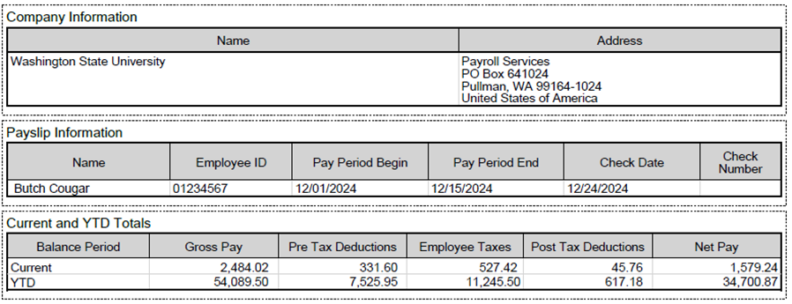
Example: Gross YTD $54,089.50 – Pre Tax Deduction YTD $7,525.95 = $46,563.55
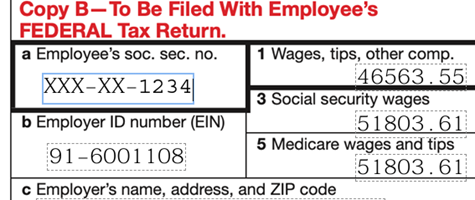
State Taxable Wage – (Box 16) Can very from box 1 total if State residency changed mid-year. Employees that resided in multiple state during the tax year will receive multiple W-2 forms, the additional W-2 will only have applicable state information completed (boxes 15 – 20 as applicable not the entire W-2)
CALCULATING SOCIAL SECURITY AND MEDICARE TAXABLE WAGES (BOXES 3 & 5)
The Social Security Wage Base for 2024 was $168,600. To determine Social Security and Medicare taxable wages on your W-2, again begin with the Gross Pay YTD from your final pay stub and make the following adjustments if applicable:
Social Security and Medicare Taxable Wage – Adjustments to Gross Pay YTD:
Subtract the following:
- Before-Tax Medical deductions YTD
- Before-Tax FSA deductions YTD
- Before-Tax HSA deductions YTD
- Before-Tax Parking deductions YTD
The resulting amount should equal Box 3 Social Security Wages and Box 5 Medicare Wages on your W-2.
EXPLANATION OF BOX 12 ON YOUR W-2
- Box 12D: Federal Thrift Savings Plan
Box 12E: 403B deductions
Box 12G: 457 Plan deductions - Box 12W: Employer contributions and employee elected contributions to HSA
- Box 12BB: 403B Roth deductions
- Box 12DD: Cost of employer sponsored Health Insurance, paid on your behalf
- If you find that after making these adjustments to your Gross Pay YTD per your final pay stub, the result does not match Box 1 Federal Wages and Box 16 State Wages on your W-2, call Payroll Services, 509-335-9575.
Box 14: New W-2 Reporting Requirement: Overtime Premiums
- To comply with new reporting requirements under HR1, commonly referred to as the “One Big Beautiful Bill Act,” Washington State University (WSU) will report the qualified overtime premium paid to employees during the 2025 tax year in Box 14 of Form W-2. This amount will appear with the label “2025 OVT.”
- What You Need to Know
- The amount reported reflects only the premium portion of overtime compensation (generally the additional 0.5× rate paid above the employee’s regular hourly rate for eligible overtime hours).
- The Box 14 entry is for informational purposes only and does not change the taxable wages reported in Boxes 1, 3, or 5.
- Employees are not required to take any action on their tax returns based solely on this Box 14 reporting. However, the information may be useful for personal records or for agencies/programs that request earnings details.
- If you have specific questions about taxability or how this may affect your individual tax situation, please consult a qualified tax professional.
Terminated and Retired Employees
- All terminated will receive a paper W-2 form mailed to the address on their employee record in Workday.
- All retired will receive a paper W-2 and or a 1099R form mailed to the address on their employee record in Workday.
- After you leave or retire from the university, you can still access Employee Self-Service. This lets you get your W-2 and other information for filing taxes. If you need help signing in or resetting your password, contact the Crimson Service Desk or call 509-335-HELP (4357).
What if I don’t receive my tax forms in the mail?
W-2 forms are available in your Workday Self Service Portal no later than January 31. If you have not received your W-2 or need replacement copies, please log in to Workday to access them. Payroll Services does not mail out replacement copies.
**1099R and 1042S Tax Documents are not available online. For copies of these tax forms, please complete the REQUEST FORM and submit it to Payroll Services.
Does my W-2 include my scholarship/fellowship payments?
No, fellowship payments to U.S. Citizens are not reported on a W-2. If you are a nonresident alien in F-1 or J-1 student immigration status, any scholarship or fellowship payments you receive are subject to 14% federal tax withholding unless you are eligible for tax treaty exemption. These payments will be reported on Form 1042-S, which will be mailed out no later than March 15
I had an overpayment last year, how does this affect my W-2?
If the overpayment was completely repaid in the prior year, your W-2 will not include the extra amounts for the overpayment. If your overpayment has not been completely repaid, your W-2 will include the extra amounts for the overpayment.
If your overpayment is repaid in a future year, you’ll receive a corrected W-2 with adjustments to Social Security and Medicare taxes (if applicable) and a receipt for the amount repaid. Include the receipt with your tax return for the year in which you made the repayment.
If you have additional questions, please email overpayments.
What if my name is different on my W-2 or my Social Security Number (SSN) is incorrect?
Make sure the name on your Social Security card matches the name on your W-2. If your name is not correct with the university, you will need to complete the name change process and request a W2-C with the updated name. If your Social Security card name is not correct, you will need to reach out to the Social Security Administration.
Only the last 4 numbers are listed on the W-2. If employees see a discrepancy, employees either call our office to verify we have the correct Social Security Number at (509-335-9575), or they can verify it through Workday. Workday instruction can be found here. If your Social Security Number is incorrect, please email Payroll Services.
What if my current address is different than the address on my W-2?
The IRS matches your name and Social Security number against its database. However, the IRS does not check your address. Make sure to use your current address when filing your personal income tax return.
Industrial Insurance
Every pay cycle you work there is a deduction and contribution for Medical Aid / Worker’s Compensation. This deduction and contribution is remitted to the State Department of Labor and Industries. This money resides in a benefit pool which is used to pay employees who have suffered from on-the-job accidents.
This deduction and contribution vary per pay cycle. The reason for the variance is because the calculation (rate) is based on the number of hours worked in each pay cycle. There is no additional deduction once the number of hours worked in the month exceed one hundred and sixty (160) hours.
The hourly rate for this calculation changes at least annually. Payroll Services always provides a message via Workday Announcements when we have been instructed to change the rate.
Current rates can be found on the Budget Office website.
Based on enrolled number of credit hours.
FICA is the Federal Insurance Contribution Act. This Act precludes students from participating in Social Security and Medicare coverage.
The Internal Revenue Service states that if the employment is “incident to” the education, then the student retains the Student FICA Exemption. However, if the education is “incident to” the employment, then the student loses the Student FICA Exemption. If a student loses the exemption, then Social Security and Medicare deductions will be taken. The University also matches the Social Security and Medicare deductions.
Washington State University has determined that if a student meets the credit hour eligibility determination for Financial Aid and is recognized as a student by the Federal Government, WSU will recognize and retain the Student FICA Exemption for this individual. The credit hour eligibility determination for undergraduates is six (6) or more credit hours during the Fall or Spring, and three (3) or more credit hours during the Summer term. The credit hour eligibility determination for graduate students is six (6) or more credit hours during the Fall or Spring and three (3) or more credit hours during the summer term.
Prior to each semi-monthly payroll calculation, the OARS System is accessed to determine the number of enrolled credit hours per student. If the student employee does not meet the minimum number of credit hours, then their earnings are changed from student to non-student, while losing the Student FICA Exemption. Social Security and Medicare are then deducted, remitted and reported to the Federal Government, as well as the employer contributions.